 DEVELOPING COLOR


잘 쓰고 있습니다! 처음 다빈치리졸브를 만져보는데, 엄청난 도움이 되고 있습니다! 감사합니다!


Video LUTs
Couldn't load pickup availability
Install guide + video tutorials included · Stuck? hi@ypresets.com
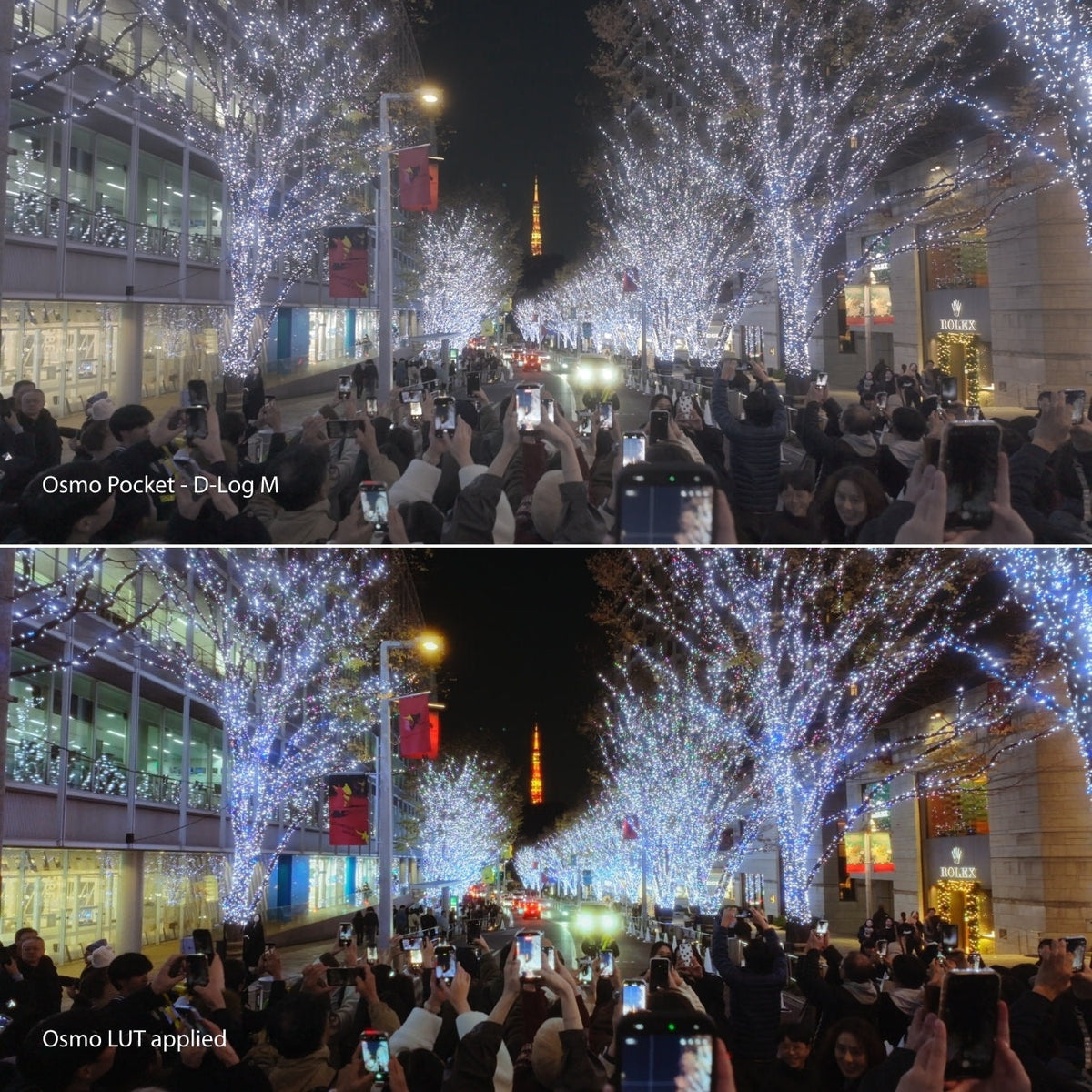
One-click cinematic LUTs for DJI Osmo. 30 LUTs in dedicated folders, 10 each for D-Log M, D-Log and D-Log 2, for Osmo Pocket 3, Pocket 4, Pocket 4P, Osmo Nano, Osmo 360 and Osmo Action. The Rec.709 conversion is built in, so you skip DJI’s LUT and the smartphone look.
 D-Log, M & D-Log 2
 30 one-click LUTs
 Instant Download
D-Log and D-Log M are designed to capture more dynamic range and flexibility - but straight out of camera, the footage can look flat, washed out, and hard to work with.
The Ypresets Osmo LUT Pack is built to fix that instantly.
With dedicated D-Log M LUTs (Pocket 3, Osmo Nano, Osmo 360, Action), dedicated D-Log LUTs (Osmo Pocket 4 and Pocket 4P) and dedicated D-Log 2 LUTs (Pocket 4P and other D-Log 2 Osmo cameras), you can apply cinematic color in one click - no Rec.709 conversion needed. Just drop it onto your footage, adjust the intensity if needed, and you’re ready to export.
Whether you’re shooting on Osmo Pocket 3, Pocket 4, Pocket 4P, Osmo Nano, Osmo 360, Action 4, 5 Pro or 6 — these LUTs are designed to give you clean, natural, cinematic results in seconds. Flying a DJI drone on D-Log or D-Log M? Use the Drone pack.
Not sure which Log your Pocket or Nano is recording? Read the Creator Lab guide: Osmo Pocket 4 vs Pocket 4P vs Osmo Nano color profiles.
30 LUTs, each folder matched to its profile:
Apply once, adjust intensity, export. Instant download. Lifetime use. Personal, commercial and client work. Files arrive by email and at account.ypresets.com.
Handheld only: Osmo Pocket 3, Osmo Nano, Osmo 360, Osmo Action 4, Osmo Action 5 Pro, Osmo Action 6.
If the menu says D-Log M on those cameras, this pack works. Flying a DJI drone on D-Log or D-Log M? Use the Drone Cinematic D-Log & D-Log M LUTs instead.


New · D-Log 2
Built for Osmo Pocket 4P D-Log 2 footage. Already own the pack? They're a free update, waiting in your download.


Reviews
Overall rating: 4.9 / 5 from 43 reviews.
잘 쓰고 있습니다! 처음 다빈치리졸브를 만져보는데, 엄청난 도움이 되고 있습니다! 감사합니다!
Perfect

I really think this will help with my workflow. I'm not a really an advanced video editor but with this LUTs, it will definitely help me in leveling up my quality of getting more followers. Really love the colors so far!

Lots of different visual styles to play around with. Gives the raw footage an immediate cinematic look. It's compatibility for various software is also a massive plus.

Can definetly recomend, love how the shots look like with those LuTS

I’m completely new to shooting in log and color grading, but this was incredibly easy to use and gave me great results right away. Perfect for beginners!
I LIKE IT

great!

No need to look anywhere. These LUTs are all you need! My fave is lut#6 😍

Exactly what I needed! Thanks guys!
Amazing

Very happy with the filter pack for Osmo Pocket, which also includes D-Log M for my DJI Nano. I've also tested them in O-Log on my OPPO Find X9 Ultra and they work very well.

killer luts this was off of the pocket 4p! 🤙🏽

It’s so easy to use — I just have 2-3 nodes before the LUT node where I use Yantastic LUTs and usually only need minimal edits to my D-Log footage.The colors come out great!

These genuinely look good always

New to the luts game and these are AWESOME LUTS!!! Can't wait to finish editing all the travel vlogs!

amazing

Loved the luts, My expectations were met
Easy to use and very good quality LUTs

The lut looks super cool even with apps like VN it made my action6 shots feels cinematic

Great colours. A little stylized but that’s the look I like to achieve in my content!

Love the LUTS! Ready for more!
son una maravilla!

Excellent

so easy

What a fantastic set of D-Log Luts you created.I already used the D-Log Lut 1 for my Pocket 4 as can be seen in the windmill video I made. The full video can be seen on my YT channel Gekol Drone Videos. Here is the link: https://www.youtube.com/watch?v=ss2gL-VNMSk I already dit a short test on some of my D-Log drone footage from my DJI Mini 5 Pro also. The result was very good and colors from handheld and drone footage are consistent. The fact that your D-Log Luts are perfected for both my DJI Osmo Pocket 4 and D-log footage from my DJI drones makes it fantastic. I will publish a combined DJI Pocket 4 D-Log and DJI Mini 5 Pro or Air 3S D-Log video later using your different set of Luts! Thanks for making the D-Log Luts. Hope to see more new Luts and updates. Greetings from The Netherlands. Gekol Drone Videos.

This is an excellent luts for my dji osmo pocket 4, im loving the colors and different style defending on your liking, theres 20 presets to choose from, highly recommended!! It’s worth it

Sick💯

I’m a rookie, but I think it feels good and looks good, don’t you?

Verry good
Amazing Luts

Unreal presets 🔥

The LUTs work great! Apply them first, then adjust your balance and grading from there. They give footage a cinematic film look quickly and easily. Definitely worth having!

Good

Amazing nd very easy to use!!!!!
I used this lut pack with an osmo 360 the results are superb I recommend and no need for Rec-709 the lut in question is enough
Film look with a click, adjust the opacity if needed and voila.

Finally have go to luts for all my DJI products

immediately elevated my work! love it
Excellent set of LUTs for my DJI cameras. Worth the price. Many thanks.

