


Osmo Cinematic LUTs
Osmo Cinematic LUTs
Couldn't load pickup availability
One-click cinematic LUTs for DJI creators. Created for D-Log M & D-Log footage shot on DJI Osmo Pocket 3, Osmo Pocket 4, Osmo Pocket 4P, and Osmo Action cameras.
Learn more
Learn more
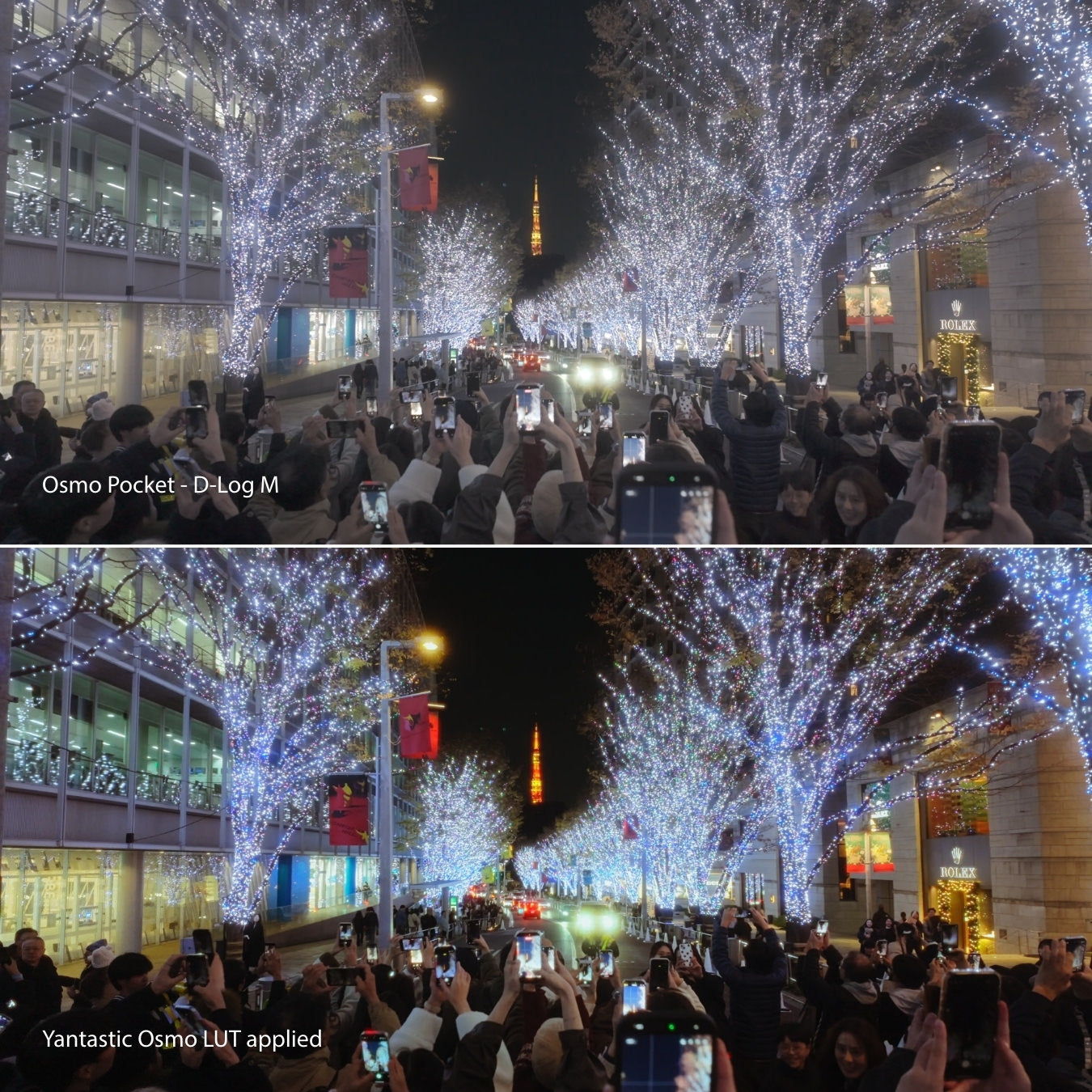
D-Log and D-Log M are designed to capture more dynamic range and flexibility - but straight out of camera, the footage can look flat, washed out, and hard to work with.
The Yantastic Osmo LUT Pack is built to fix that instantly.
With dedicated LUTs for both D-Log M and the new D-Log profile on Osmo Pocket 4, you can apply cinematic colour in one click - no Rec.709 conversion needed. Just drop it onto your footage, adjust the intensity if needed, and you’re ready to export.
Whether you’re shooting on Osmo Pocket 3, Pocket 4, Action 4, 5 Pro or 6, or flying a Mini 4 Pro, Air 3, Air 3S, Avata 2, Mavic 3 Series or Mavic 4 Pro - these LUTs are designed to give you clean, natural, cinematic results in seconds.
What’s Included
What’s Included
You get a full set of 20 custom-designed LUTs:
10 D-Log M LUTs
10 D-Log LUTs (for Osmo Pocket 4)
Every LUT is built specifically for DJI’s D-Log and D-Log M profiles, so there is no need for complicated workflows or conversions.
Just apply once, adjust the intensity, and export.
What cameras record D-Log M?
What cameras record D-Log M?
These LUTs support every DJI camera that records in D-Log M, including:
Handheld Cameras
Osmo Pocket 3
Osmo Action 4
Osmo Action 5 Pro
Osmo Action 6
Drones
Mini 4 Pro
Air 3
Air 3S
Avata 2
Mavic 3
Mavic 3 Classic
Mavic 3 Pro
Mavic 3 Cine
Mavic 4 Pro
If your device shoots D-Log M, this pack works perfectly.
If you shoot D-Log instead of D-Log M for example on certain Mavic Pro series models this pack will not give accurate results. D-Log and D-Log M are different colour profiles. Please consider our dedicated Drone D-Log LUTs which are designed specifically for full D-Log footage.


“Finally found my go-to LUTs for all my DJI cameras.”
FAQ
Which cameras can shoot D-Log M?
D-Log M is available on newer DJI cameras such as the Osmo Pocket 3, Osmo Action 4, Osmo Action 5 Pro, Osmo Action 6 and select DJI drones that offer D-Log M recording. If your camera lists D-Log M in its video colour settings, it is supported.
Which cameras can shoot D-Log?
Osmo Pocket 4
How many LUTs are included?
You get 10 cinematic LUTs for D-Log M, and 10 cinemtic LUTs for D-Log, all crafted to work beautifully with DJI footage.
Do I need to convert to Rec.709 first?
No. These LUTs are made to be applied directly to D-Log M and D-Log footage.
Just drop the LUT on your clip and adjust intensity to taste.
Will these LUTs work on DJI D-Log (non M) footage?
No.
D-Log and D-Log M are two different gamma profiles.
If you shoot on drones like the Mavic 3 series or older DJI models that use D-Log, please use our Drone D-Log LUTs instead for accurate colours.
Do these LUTs work for both day and night footage?
Absolutely. Whether you are shooting daytime landscapes or night city scenes, the LUTs adapt well with minor adjustments.
Can I use these LUTs for client or commercial work?
Yes. Your purchase includes full usage rights for personal, commercial, paid and client projects. No extra licence needed.
How do I install the LUTs?
After purchase, you’ll receive a quick-start PDF showing how to install and use the LUTs in DaVinci Resolve, Final Cut Pro, Premiere Pro. The whole process takes less than a minute.
Which apps can I use these LUTs with?
Your pack works perfectly in:
LumaFusion
CapCut
DaVinci Resolve
Final Cut Pro
Premiere Pro
After Effects
Resolve for iPad
Any editor that supports .cube LUTs
Just apply the LUT once, then adjust intensity to taste.